Stuck on Page 2? How to Move From Page 2 to Page 1 on Google
Why pages stall at positions 11 to 20, and the order of fixes that moves them: striking distance queries, semantic coverage, page-level links, internal links and the click.
On this page
A page on the first page of Google can bring in buyers every day without a cent of ad spend. For a software company, one page-one ranking on a buying search can bring in steady buyers long after the work is done.
Page two gets almost none of that. Since mid-2024, desktop results are split into numbered pages again, so position 14 means a click through to a second page.
If you have spent months trying to move a page from page 2 to page 1 while it sits at position 14, you know the feeling. It is close enough to keep you hoping and far enough that buyers never see it.
But you can't tell what is holding it back. It could be the content, the backlinks or the site itself. Each fix takes weeks. Picking the wrong one costs another quarter on page two.
So what actually moves a page from page 2 to page 1, and in what order?
I worked through Google's documentation, the ranking studies from Semrush, Backlinko and Ahrefs, and the pages that rank for this question. I also build LinkGecko, a link intelligence tool for software companies, so links are the part of this answer I have a stake in.
How to move from page 2 to page 1: the quick answer
- Pick the right pages. Start with queries in Search Console where you sit around positions 11 to 20 and already get impressions.
- Close the semantic gap. Cover the subtopics, questions and terms the top five results share, rather than repeating the keyword.
- Close the page-level link gap. Domain strength matters but takes years to change. Links from a few relevant sites to that exact URL are the gap you can close this quarter.
- Pass on authority you already have. Add internal links from your most-linked pages to the stuck page.
- Measure in the right windows. Give content changes about four weeks and new links two to three months before judging them.
Why pages get stuck on page 2
A page stuck on page 2 usually has a relevance gap, a link gap or both. Google has already found it, indexed it and judged it relevant to the query. What it lacks is a reason to rank above the ten pages ahead of it.
That reason comes from how completely the page answers the query, and how much the rest of the web vouches for it. Google's ranking systems guide says PageRank, its link analysis system, "continues to be part of our core ranking systems." Since March 2024, the helpful content system has been part of those core systems too.
0.63%
The share of searchers who clicked anything on page two, in Backlinko's study of four million Google results.
Step 1: Find the pages that are close to page 1
Search Console already lists your near-misses. These are often called striking distance keywords: queries where a page ranks just below page one and already earns impressions.
- Open the Performance report and pick the last 28 days.
- Turn on average position and filter the table to positions greater than 10. Ignore anything past 20, or 30 if the list is short.
- Sort by impressions, so queries people search often come first.
- Click a query and open the Pages tab, so you work on the exact page that ranks for it.
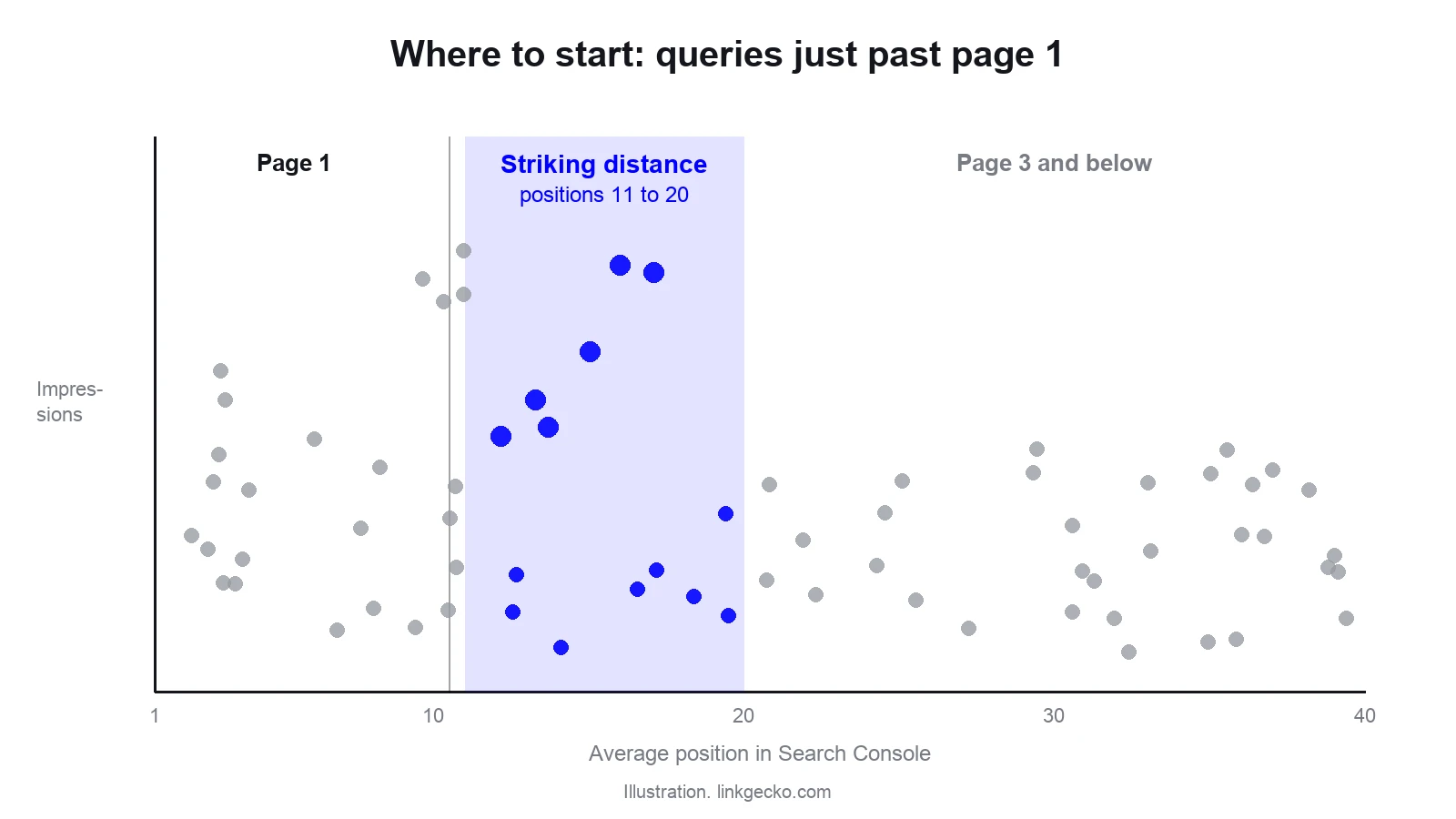
Average position is "the topmost position occupied by a link to your property", averaged across queries. A position of 11 does not always mean a literal page two.
Around mid-September 2025, Google stopped honoring the setting that loads 100 results per page, and Search Console impressions dropped for many sites. A before-and-after comparison should sit on one side of that date.
A page that matches a different search intent than the top five, or competes with another of your pages for the query, needs that fixed first. Some queries aren't worth the push at all. When the top ten is all major brands and forum threads, the effort rarely pays back, and the next query in the list is the better bet.
Step 2: Close the semantic gap
Semantic keywords are the related terms, subtopics and questions that show a page covers a topic fully. A page about CRM pricing that never mentions seats, contracts, free plans or onboarding fees reads as thin next to pages that do.
To find the gap, open the top five results for the query and list what most of them cover that your page doesn't. Look at their headings, the People Also Ask questions on that results page, and the entities and attributes they mention, such as product names, prices, limits and steps. When most of the top five cover a subtopic your page skips, that subtopic is the likeliest part of the gap.
Then add the missing pieces where a reader would look for them. A new section that answers a missing question is worth more than the keyword repeated ten more times. Requesting indexing in the URL Inspection tool gets the updated page recrawled sooner.
Writing longer doesn't close the gap. Google's helpful content guidance asks whether you are writing to a word count because you heard it has a preferred one. Its answer: "No, we don't." Backlinko found word count was spread evenly across the top ten, while a content relevance score tracked rankings. Semrush's 2024 study found content relevance and quality had the strongest link to higher positions.
Changing a page's date without changing its content doesn't help either. Google asks whether you change dates "to make them seem fresh when the content has not substantially changed."
Step 3: Close the link gap, page by page
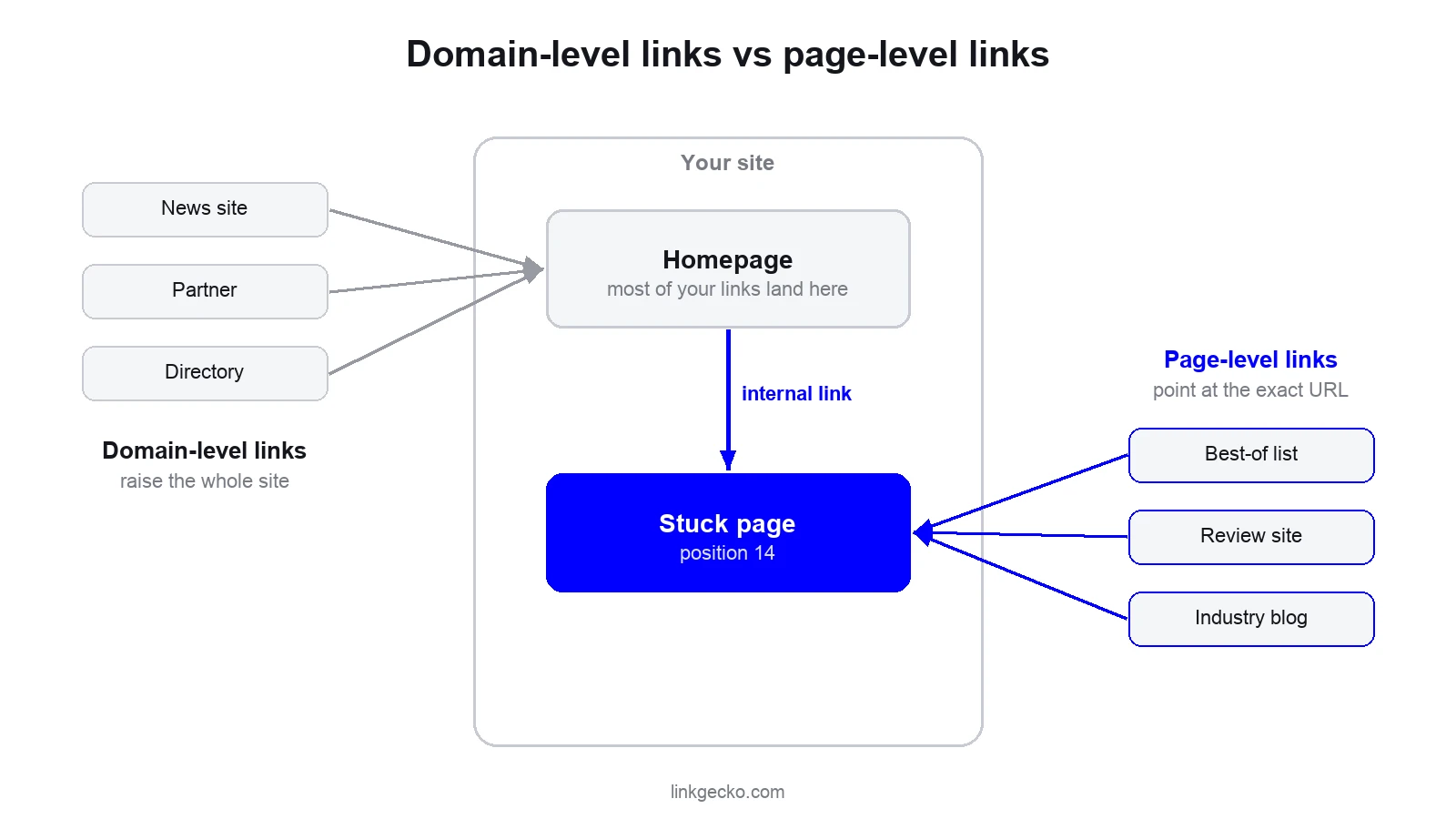
Links count at two levels: links to your domain and links to the exact page.
Domain-level links point anywhere on your site and build its overall authority. Backlinko found a site's overall link authority "strongly correlates" with higher rankings, while page authority, measured by Ahrefs URL Rating, correlated only weakly. Domain strength tends to decide whether your pages reach the first two pages at all. It also takes years to build, so it is a slow lever for one stuck page.
Page-level links point at the exact URL you want to rank. The numbers here are small. In Semrush's 2024 study of 16,298 keywords, the median page in the top ten had links from just 6 referring domains. The average was 112, pulled up by a few heavily linked pages.
So the gap between position 14 and position 8 can be a few good links to that page, not hundreds. The same Semrush study found links from unique domains still matter "both at page and at domain level."
Which links to go after
Not every competitor link is worth matching, and some can't be copied at all, such as a partner's integration page.
- Shared links first. Sites that link to two or three of the pages above you already link out on this topic, so they are the best place to start. A link intersect report lists them.
- Relevance over raw scores. A link from a site about your topic, on a page about your topic, carries more meaning than a higher Domain Rating on an unrelated site.
- Editorial placement. A link inside the body of an article, placed by an editor, beats a footer, sidebar or directory entry.
- A page people read. A linking page that gets search traffic, or that AI answers cite, sends visitors as well as authority.
- Plain, descriptive anchor text. Google says good anchor text "is descriptive, reasonably concise, and relevant" to both pages. Exact-match anchors on every link look engineered.
Link building for a stuck page is a short, specific project. The list is the sites that already link to the pages ahead of you, plus the ones writing about your topic now. LinkGecko builds that list for a category and shows which sites link to competitors and not to you.
Buying links breaks Google's spam policies, which list "buying or selling links for ranking purposes" as link spam. Google may ignore a bought link. A pattern of them can cost you rankings you already have.
Step 4: Move the authority you already have
Internal links are a lever you can pull today. Google's link guidance says it uses links "as a signal when determining the relevancy of pages." It also says every page you care about should be linked from at least one other page on your site.
The strongest internal links come from your most-linked pages. Ahrefs' study of pages with no search traffic makes the same point at site level: stronger sites "have more PageRank that they can pass to pages with internal links."
- Open the Links report in Search Console and look at your top linked pages.
- Pick the three to five that are closest in topic to the stuck page.
- Add a link from each to the stuck page, inside a sentence where it helps the reader, with anchor text that describes the page.
A new page linked only from the blog index sits far from your site's authority. One link from a page that already ranks puts it much closer.
Step 5: Earn the click once you reach page 1
A page at position 8 still gets few clicks. The same Backlinko data showed moving up one spot lifts click-through rate by 2.8% on average, and that positions 8 to 10 get almost the same share.
A title tag that names the exact problem and a meta description that promises a specific answer earn more of those clicks. That matters more now, because page one can sit below an AI Overview or AI answer. First Page Sage's 2026 client data shows position 1 drawing a 3.6% click-through rate when an AI answer appears, against 22.6% when none does.
The pages AI answers cite tend to be the same pages worth earning links from. A mention on those pages can count toward rankings and answer engine optimization at once.
How long it takes to move from page 2 to page 1
Content and title changes are fair to judge about four weeks after a recrawl. New links need a longer window, two to three months, before they count.
Ahrefs found that 40.82% of pages that reached the top ten got there within a month of publishing. The average page at #1 was five years old, and Ahrefs suggests updating a page that is still outside the top ten after about six months.
Compare the same 28-day window before and after each change, at the query and page level. A page that moves from 14 to 9 on its main query has moved from page 2 to page 1, even if the sitewide average barely shifts.
When a page won't move
If a page hasn't moved after two link cycles, the query may belong to the brands and forums above it. Moving the effort to the next query in your striking distance list costs less than another quarter on the same one.
Frequently asked questions
Google already finds the page relevant, but the pages above it either cover the topic more completely or have more relevant sites linking to them. Comparing your page with the top five results usually shows which gap is bigger: missing subtopics and questions, or fewer referring domains to that exact URL.
Content and title changes can be judged about four weeks after Google recrawls the page, and a fair window for new links is two to three months. Ahrefs found 40.82% of pages that reached the top ten got there within a month, and suggests updating a page still outside the top ten after about six months.
For competitive queries, usually yes. Ahrefs found 96.55% of pages get no Google traffic and named missing backlinks as a main reason. The links that move a page point at that exact URL from relevant sites, and a handful can be enough.
Updating the page that already ranks on page 2 is usually the better bet, because it keeps the links and history it has earned. A new page starts from nothing and can compete with the old one for the same query.
Striking distance keywords are queries where a page already ranks just below page one, around positions 11 to 20, and earns impressions. They tend to be the quickest wins, because Google already sees the page as relevant. Search Console's Performance report lists them when you filter by average position.
Yes, when they come from pages with real authority. Google uses links to judge relevance, and links from your most-linked pages pass more of that weight to the page you want to rank. Descriptive anchor text inside a helpful sentence works best.
See which links decide your category
LinkGecko maps the links behind your category's AI answers and helps you build yours, from $19 a month.
Start your free trial